Getting Started
LEASH on Desktop
LEASH works on desktop
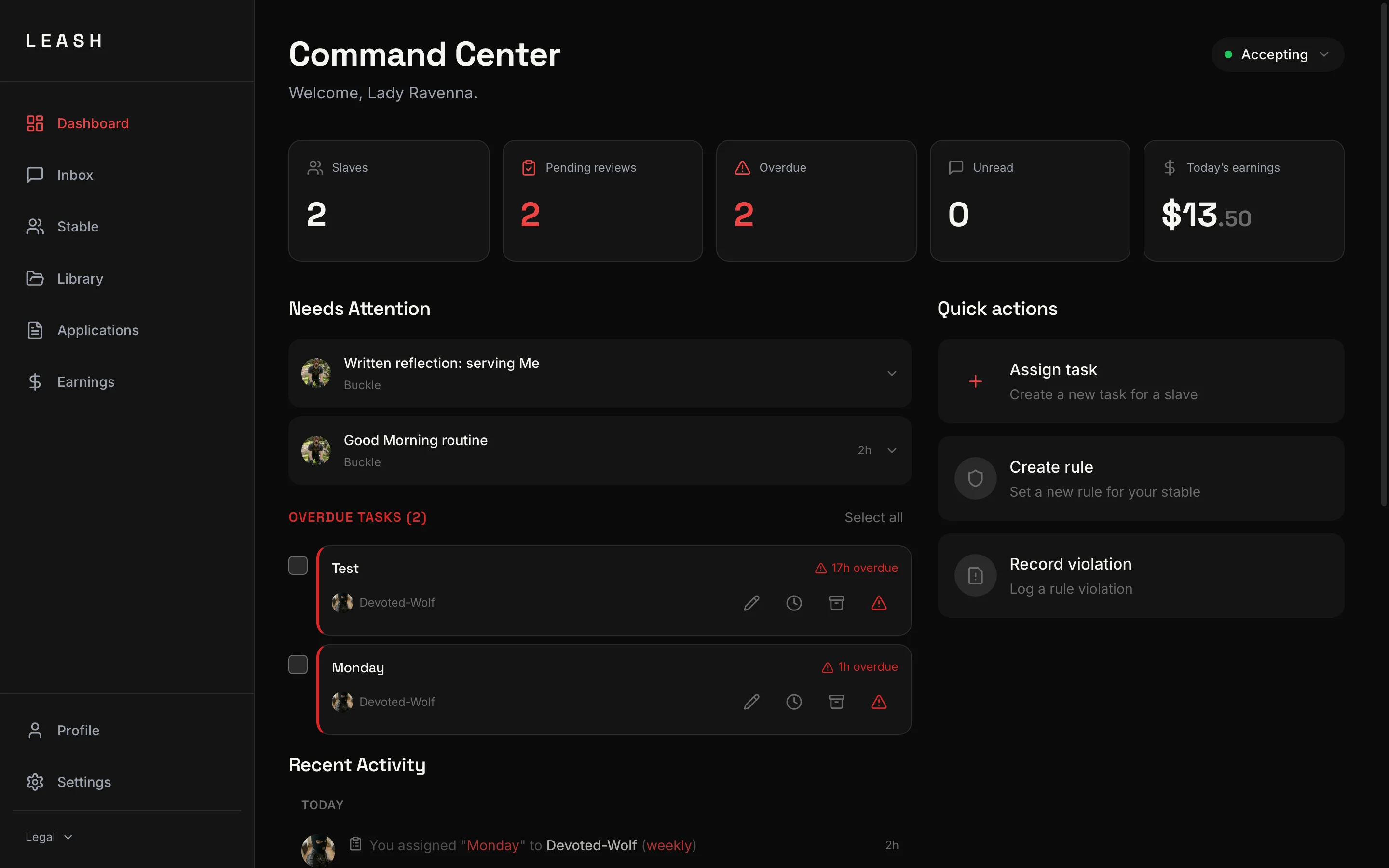
LEASH is not just a mobile app. It works fully on laptops and desktop computers, giving you a larger screen and a keyboard for everything you do on the platform.
How to access
Open app.myleash.app in any modern browser. Chrome, Edge, and Safari are all supported. Your account works across all devices — log in with the same email you use on your phone.
Install as a desktop app
For the best experience, you can install LEASH as a standalone app on your computer. This removes the browser toolbar and gives you a dedicated window that feels like a native application.
Chrome or Edge:
- Go to app.myleash.app
- Click the three-dot menu in the top-right corner of the browser
- Select "Install LEASH" or "Install app"
- A standalone window opens — LEASH now appears in your dock, taskbar, or application launcher
Safari on macOS (Sonoma or later):
- Go to app.myleash.app
- Click File in the menu bar
- Select "Add to Dock"
- LEASH appears as a standalone app in your Dock
Desktop advantages for Mistresses
A larger screen changes how you work:
- Side-by-side view — see the conversation and the slave's dossier (Living Brief) at the same time
- Stable Management dashboard — the full overview with all your slaves, tasks, and activity in one view
- Earnings graph — the full-width chart makes trends easier to read
- Task creation — writing detailed instructions is faster with a keyboard
- Manage at scale — when you have a large stable, the extra screen space makes a real difference
Desktop advantages for Slaves
Desktop is not just for Mistresses:
- Fullscreen experience — immerse yourself without distractions
- Detailed submissions — write longer, more thoughtful task submissions with a keyboard
- Comfortable for longer sessions — Live Sessions on a large screen feel more present
Push notifications on desktop
Push notifications work on desktop in Chrome and Edge. When you install LEASH as a desktop app, notifications appear as native system notifications — you will not miss messages, tasks, or tribute requests even when the app is in the background.
Cross-device sync
Your account is the same everywhere. Start a conversation on your phone during the day, continue it on your laptop in the evening. Messages, tasks, balances, and settings stay in sync across all devices automatically.
Related
Add LEASH to your home screen for the best experience — push notifications, fullscreen mode, and instant access.
A complete profile gets more attention. Learn what to add for the best results.
An AI-powered audio interview every slave completes before accessing the marketplace. It proves you're serious.
Browse verified Mistress profiles, find who speaks to you, and apply to serve. For Mistresses: how your profile appears and how to attract slaves.